Disk Drill is a data recovery app from CleverFiles that runs on Windows and Mac. It can bring back deleted files, recover data from formatted drives and memory cards, and rebuild lost partitions. In this Disk Drill review, we look at what version 6.3 does well, where it falls short, and whether the PRO plan is worth paying for in 2026.
Disk Drill is one of the easiest recovery tools for home users and photographers. It shows a recovery chance for every file, lets you preview files before you pay, and has strong tools for camera footage and failing drives. The downsides are the price, slow scans on large external drives, and a strict no refund policy. Run the free scan first and only buy if your files open in the preview.

Disk Drill at a Glance
| Detail | What You Need to Know |
| Developer | CleverFiles Inc., USA (first builds released in 2009) |
| Latest version | 6.3 for Windows and macOS, released July 22, 2026 |
| Supported systems | Windows 10 and 11 (64-bit and ARM), macOS 10.15 to 27 |
| Free version | Windows: recover up to 100 MB. Mac: scan and preview only |
| PRO price | $89 per year or $149 one time for a lifetime license |
| License covers | 1 user, up to 3 computers, both Mac and Windows |
| Refunds | Not offered, except where local consumer law requires |
| Best for | Deleted files, formatted cards, camera footage, lost partitions |
| Not suited for | Physically damaged drives, SSDs with TRIM, files locked by ransomware |
How We Put Together This Disk Drill Review
For this CleverFiles Disk Drill review, we went through the official product pages, every release note from version 5.2 to 6.3, the current pricing and refund terms, and recent feedback from paying users on Trustpilot. To review Disk Drill fairly, we also compared published lab tests with what CleverFiles says the app can do. Where those sources disagree, we say so.
This matters because a lot of older reviews are now out of date. Prices, free limits and some features have changed in the last year. A Disk Drill data recovery software review is only useful if it reflects those changes, so we checked each claim against the current official pages.
We also ran our own recovery test on a USB flash drive. You will find the full results in the hands-on test section below.
What Is CleverFiles Disk Drill?
CleverFiles Disk Drill is a do-it-yourself recovery app. It scans a storage device, finds files that were deleted or lost, and copies them to a safe place. You do not need technical skills to use the basic features.
Work on the app began in 2009, and CleverFiles was incorporated in Atlanta in 2011. The company now operates from New Castle, Delaware. The Mac version came first and the Windows version followed later. Today both share the same version number, the same features in most areas, and the same license.
The idea behind it is simple. When you delete a file, your computer usually does not erase it. It only marks that space as free. Until new data is written over that spot, a tool like Disk Drill can read the old file and save it again.
What Is New in Disk Drill 6.3
Version 6.3 arrived on July 22, 2026, for both Windows and Mac. It follows version 6.2 from March 2026, which added an online video repair service inside the app. These are the changes most users will notice:
- Lost BitLocker partitions: Disk Drill can now find and recover lost partitions protected by BitLocker, the drive encryption built into Windows.
- Damaged video check: the app looks at broken or unplayable videos and points you to the Online Video Repair tool when normal recovery cannot fix them.
- Better camera recovery: improved results for Insta360, Ricoh and Uniden cameras, plus a choice to skip or attempt corrupted files.
- Encrypted files in their own group: recovered files that were encrypted are now sorted separately, so you can spot them quickly.
- Stronger ReFS and APFS support: better scanning of Windows Server ReFS drives and encrypted Mac APFS partitions.
You can read the full change history in the official Disk Drill release notes.

Key Features of Disk Drill Data Recovery Software
Universal Scan
Universal Scan is the main scan mode. It runs several search methods at once and merges the results, so one file does not appear twice because two methods found it. You can browse found files while the scan runs, and you can even start recovering before it finishes.
Some older reviews say you cannot save a scan. That is no longer true. Disk Drill lets you save a scan session and load it later, which is useful when a large drive takes hours to scan.
Recovery Chances and File Preview
Every found file gets a label such as high, average or low recovery chance. You can also open a preview of photos, videos, documents and audio before paying. This preview is the single most useful feature for avoiding a wasted purchase, and we explain why in the user feedback section below.
Advanced Camera Recovery
Added in version 6.0, this mode is built for photos and videos from cameras, drones, dashcams and action cams. Video files on these devices are often stored in scattered pieces. A normal deep scan may find only broken parts. Advanced Camera Recovery tries to put those pieces back in the right order. It supports a long list of models from GoPro, Sony, Canon, Nikon, Panasonic, Leica, Insta360 and others.
Byte-to-Byte Backup
A failing drive can get worse with every read. Disk Drill can first copy the whole drive into a single image file, sector by sector. You then scan that copy instead of the weak drive. Since version 6.1, the backup can pick up where it left off if the drive disconnects, and it can include BitLocker partitions.
Recovery Vault and Free Extra Tools
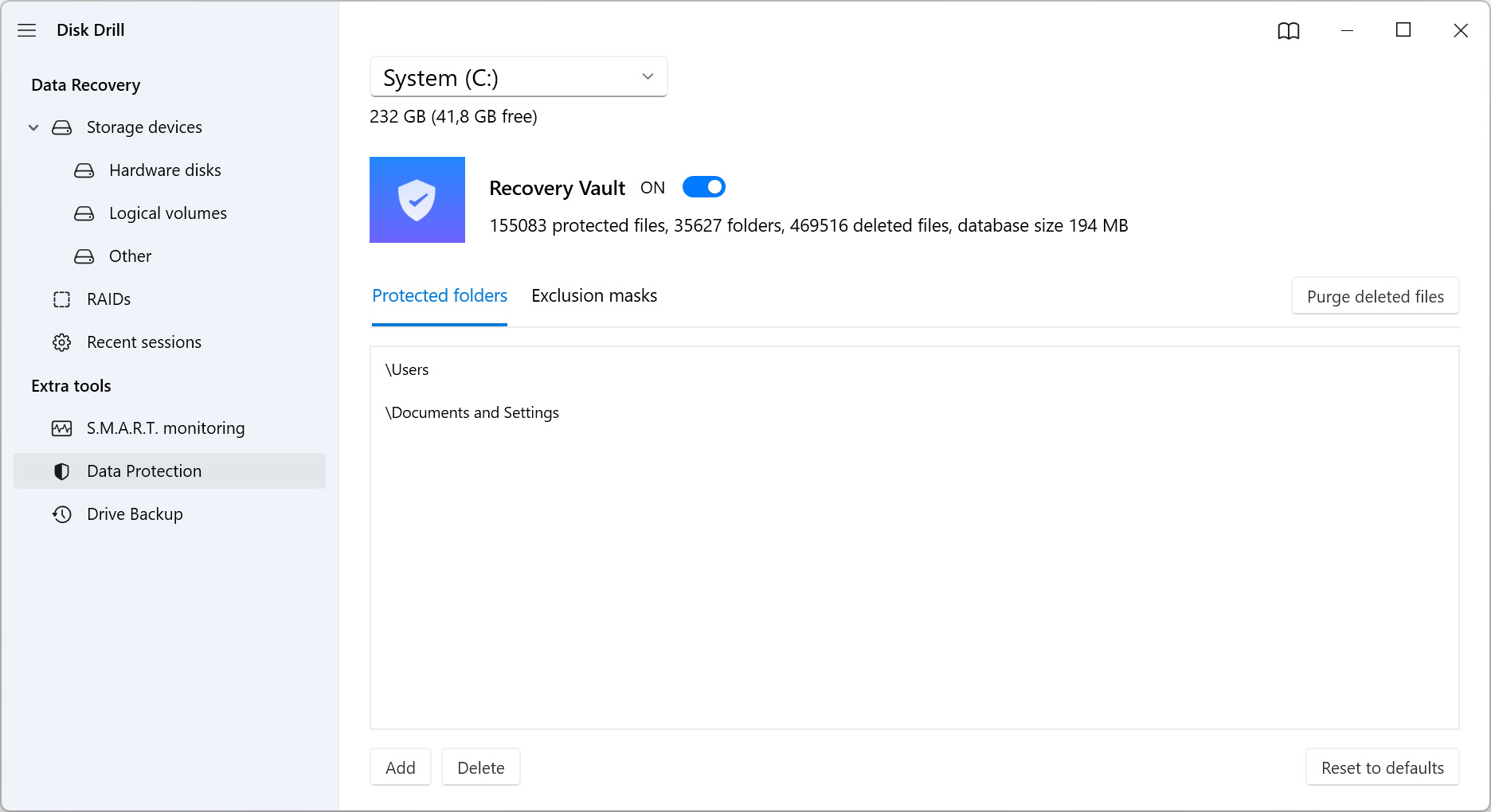
Recovery Vault keeps a record of deleted files in the folders you choose to protect. If you later delete something from one of those folders, you can restore it in one click, even with the free version. The app also includes free drive health monitoring, which reads the warning data most drives keep about themselves, plus a disk space cleaner. Mac users also get a duplicate finder and a tool to make a bootable recovery drive.
NAS, RAID and Linux Recovery
Disk Drill can connect to a network storage box or a Linux computer over SSH, which is a secure remote connection, and scan its drives without removing them. It also detects and rebuilds common RAID setups, where several drives work together as one. Most home users will never need this, but few tools at this price include it.
iPhone and Android Recovery
The Mac version can scan iPhones, iPads and rooted Android phones for items like messages, contacts, call history and notes. On Windows, iPhone recovery is still in beta, and you have to ask support for access. If phone recovery is your main goal, a tool built only for phones may suit you better.
Supported File Types, Devices and File Systems
Disk Drill can identify about 400 file types by their internal structure. That includes common formats like JPG, PNG, HEIC, MP4, MOV, DOCX, XLSX, PDF and ZIP, plus RAW photo formats from most major camera brands. CleverFiles keeps a full list of supported file types if you need to check a rare format.
It works with internal hard drives and SSDs, external drives, USB flash drives, SD and CF cards, cameras that connect as USB storage, RAID arrays, virtual disks and disk images. Supported file systems include NTFS, FAT16, FAT32, exFAT, ReFS, HFS, HFS+, APFS, EXT2, EXT3, EXT4 and BTRFS. It can also scan drives that show up as RAW, meaning your system cannot read their format.
| Requirement | Windows | Mac |
| Current version | 6.3.1398 | 6.3.2326 |
| Operating system | Windows 10 or 11 (64-bit), Windows 11 ARM | macOS 10.15 to macOS 27 |
| Download size | 51.3 MB | 69.7 MB |
| Hardware | 4 GB RAM and 1 GB free space | Intel, T2 and Apple silicon Macs |
| Older systems | Disk Drill 2.x to 5.x for Windows XP to 8.1 | Disk Drill 1.x to 5.x for older Mac OS X |
Before You Run a Scan
A few quick checks can save you money and protect your files. First, stop using the affected drive right away, because every new file you save can overwrite what you lost. Second, look in the Recycle Bin or Trash, cloud storage, File History on Windows, or Time Machine on Mac. If the file is there, you do not need recovery software.
If you lost photos from a camera card, take the card out and do not shoot anything new on it. Formatting it again in the camera can make recovery harder.
How to Recover Files With Disk Drill
The process is nearly the same on Windows and Mac. It takes five steps.
Step 1: Install Disk Drill on a Different Drive
Download the app from the official site. If your lost files were on drive C, install Disk Drill on another drive if you can. Installing it on the same drive may overwrite the data you want back.
Step 2: Choose the Drive to Scan
Select the drive or card from the list. Pick the whole physical disk rather than a single partition, as this often finds more files. If the drive is slow, makes noises or keeps disconnecting, create a byte-to-byte backup first and scan that copy.
Step 3: Start the Scan
Click Search for lost data. Choose Universal Scan for most cases, or Advanced Camera Recovery for camera and drone footage. Scan time depends on the size, speed and health of the drive.
Step 4: Filter and Preview the Results
Use the file type tabs, filters and search box to narrow the list. If a file is missing from the Deleted or lost section, check the Reconstructed section, where files rebuilt from their internal structure appear. Open a full preview of every important file.
Step 5: Recover to a Separate Drive
Select your files and click Recover. Save them to a different drive from the one you scanned, since saving to the same drive can damage files during recovery. Once you have your data back, turn on Recovery Vault for your key folders.
Disk Drill Free vs PRO
The free version is called Disk Drill Basic. What it lets you do depends on your operating system.
| Feature | Free on Windows | Free on Mac | PRO |
| Scan and preview | Yes | Yes | Yes |
| File recovery | Up to 100 MB | Only files protected by Recovery Vault | Unlimited |
| Backup, drive health and cleanup tools | Yes | Yes | Yes |
| Use on both Mac and Windows | Not applicable | Not applicable | Yes, one license |
Many older reviews mention a 500 MB free limit. The current free limit on Windows is 100 MB. That covers a few documents or a handful of photos, but not most videos.
Disk Drill Pricing in 2026
CleverFiles has changed its pricing. Older reviews list PRO at $89 as a one-time payment, with lifetime upgrades sold as an extra. That model is gone. You now choose between a yearly plan and a lifetime license, and both work on Mac and Windows.
| Plan | Price | What You Get |
| One-Year Subscription | $89 per year | Unlimited recovery and all updates while active. Renews each year unless you cancel. |
| Lifetime License | $149 one time (listed down from $239) | Unlimited recovery and all future updates with no renewals. |
| Enterprise | Custom quote | For businesses that need more users or devices. |
Both PRO plans cover one user on up to three computers, for personal or business use. Tax is included in the price shown. Orders go through Paddle, a third-party reseller that accepts cards, PayPal and bank transfer.
Which Plan Makes Sense?
The lifetime license costs about the same as 20 months of the yearly plan. If you need recovery only once, the yearly plan is cheaper, but cancel it before it renews. If you work with cameras, client files or many drives, the lifetime license pays for itself in the second year. Note that lifetime here means the lifetime of the Disk Drill product, not yours.
The Refund Policy
This is the detail many buyers miss. All PRO purchases are non-refundable, except where consumer law in your country says otherwise. So the free scan and preview is not just a bonus. Treat it as your test run. If a file does not open in the preview, it will most likely not open after you pay either.
Disk Drill Pros and Cons
Pros
- Clean, simple interface that beginners can follow without a manual
- Recovery chance labels and full previews before you pay
- Strong camera, drone and dashcam footage recovery
- One license covers Mac and Windows on up to three computers
- Free extra tools such as byte-to-byte backup, drive health checks and Recovery Vault
- Frequent updates, with a new release every few months
Cons
- Costs more than many rivals, especially the yearly plan
- Free recovery is only 100 MB on Windows and none on Mac
- No refunds once you buy
- Large external drives can take many hours to scan
- Phone recovery is mainly a Mac feature
- Support is by email and live chat only, with no phone line
What Real Users Say About Disk Drill
User ratings are split, and the pattern behind them is worth understanding. On the CleverFiles site, the app averages 4.7 from Windows users and 4.8 from Mac users. Trustpilot is more mixed. The diskdrill.com profile shows a 3.8 score from 177 reviews, with about half giving five stars and around 40 percent giving one star. The separate cleverfiles.com profile sits at 4.4 from nearly 500 reviews.
Most positive Disk Drill data recovery reviews from users mention two things: whole drives coming back with folder names intact, and quick, helpful replies from support staff. Most negative reviews describe the same problem. Files showed up in the scan, sometimes with thumbnails, but opened as empty or corrupted after purchase. A few users also said the results were full of duplicates.
Why a Thumbnail Is Not Proof
Many photo and video files carry a small preview image inside them. Disk Drill can find that small image even when the rest of the file has been overwritten. So a thumbnail in the results list does not mean the full file is intact. Always open the full-size preview before you buy. If the full preview fails, the recovered file will very likely fail too.
Duplicates have a simpler cause. The app uses more than one search method, and the same file can be found by each of them. A large file count does not equal a large number of unique, working files.
Where Disk Drill Falls Short
Deleted Files on SSDs
Most modern SSDs use a feature called TRIM, which clears deleted data in the background to keep the drive fast. Once TRIM has done its job, the file is gone, and no recovery tool can bring it back. This is a hardware limit, not a Disk Drill flaw, but it is the most common reason recovery fails on newer laptops.
Physically Damaged Drives
If a drive clicks, beeps, or does not show up with its correct size in Disk Management or Disk Utility, software will not help. Running scans on it can cause more damage. A professional lab is the right choice here, and CleverFiles runs its own recovery service for these cases.
Ransomware
Disk Drill can sometimes recover files that malware deleted. It cannot unlock files that ransomware has encrypted.
Scan Speed on Large External Drives
Internal drives scan quickly, but large external hard drives can be slow. In one published TechRadar test, a 1 TB external hard drive took more than 10 hours to scan. Plan for long scans and use the save session feature.
Mac Startup Disk Access
On Macs with Apple silicon or the T2 chip, deep scans of the startup disk rely on a kernel extension. macOS may ask you to lower its security settings in Recovery mode before the app can use it. The steps are documented, but some users find them confusing.
Disk Drill vs Popular Alternatives
| Tool | Platforms | Free Option | Best For |
| Disk Drill | Windows, Mac | 100 MB on Windows, preview only on Mac | Beginners, photographers, people who use both Mac and PC |
| Recuva | Windows | Free version available | Simple, recent deletions on a tight budget |
| EaseUS Data Recovery Wizard | Windows, Mac | Limited free recovery | Users who want a polished, guided app |
| R-Studio | Windows, Mac, Linux | Demo with a file size limit | Advanced users and complex RAID cases |
| PhotoRec | Windows, Mac, Linux | Fully free and open source | Tech-savvy users recovering photos and common files |
Disk Drill sits in the middle of this group. It is much easier to use than R-Studio or PhotoRec, and it does far more than Recuva. EaseUS is its closest rival on ease of use. The best way to choose is to run the free scan of two tools on the same drive and compare which one gives you more files that open in preview.
Who Should Use Disk Drill?
Disk Drill is a good fit if you deleted files or formatted a drive or memory card by mistake, lost footage from a camera, drone or dashcam, or use both a Mac and a Windows PC and want one license for both. It also makes sense if you want to protect important folders before anything goes wrong.
It is not the right choice if your drive is clicking or not detected at all, if the files were on an SSD with TRIM turned on, or if you only need to recover a couple of small files once and want a completely free tool.
Final Verdict: Is Disk Drill Worth It?
Disk Drill handles the most common data loss cases well. It is easy to use, it gets regular updates, and its camera recovery and drive backup tools are better than what many rivals offer. The 2026 pricing makes it more expensive for one-time users than before, and the no refund policy means you must test before you pay.
Our Disk Drill software review comes down to one practical rule. Run the free scan, open full previews of the files you need, and buy only if they open. If they do, the lifetime license gives the best long-term value. If they do not, paying will not change the result. You can download the free version from the official Disk Drill data recovery software page.
Frequently Asked Questions
Yes. Disk Drill scans drives in read-only mode, so the scan itself does not change your data. Download it only from the official CleverFiles website to avoid fake or bundled copies.
Partly. The free Windows version recovers up to 100 MB. The free Mac version lets you scan and preview files, but recovering them needs PRO, unless they were protected by Recovery Vault.
Disk Drill PRO costs $89 per year or $149 for a lifetime license. Both plans cover one user on up to three Mac or Windows computers.
Often, yes, after a quick format. A quick format only marks the space as empty. A full format on modern Windows, or any secure erase, overwrites the data, and then recovery is usually not possible.
Sometimes. If TRIM was turned off or has not yet cleared the deleted space, recovery may work. If TRIM has already run, the data is gone.
The current version needs Windows 10 or 11. CleverFiles still offers older versions, from 2.x to 5.x, for Windows XP, Vista, 7, 8 and 8.1.
No. CleverFiles does not offer refunds for PRO, except where your local consumer laws require one. Use the free scan and preview to check your files first.
Neither wins in every case. Disk Drill offers one license for both Mac and Windows on three computers, plus more free extra tools. EaseUS is equally easy to use. Run both free versions on your drive and pick the one that finds more working files.