Every time you stream a show, send a work file, or ask an AI chatbot a question, a server somewhere does the heavy lifting. Most of the time, that server doesn’t sit in your office. It lives in a giant data center you’ll never see, and you rent a slice of it.
That setup is cloud server infrastructure. It now powers everything from two-person startups to banks and hospitals. Businesses spent more than $143 billion on cloud infrastructure services in a single quarter this year, and the number keeps climbing.
This guide explains what cloud server infrastructure is, how a cloud computing system works behind the scenes, the main server and deployment types, and how to pick the right setup. No jargon walls, just clear answers.
What Is Cloud Server Infrastructure?
Cloud server infrastructure is the hardware and software that lets a provider rent out computing power over the internet. It includes physical servers, storage, networking gear, and the virtualization software that splits them into on-demand resources.
Instead of buying a server, you log in to a provider like AWS, Microsoft Azure, or Google Cloud and launch one in minutes. You pay for what you use, and you shut it down when you’re done.
Cloud Server vs. Cloud Infrastructure
People often mix these two terms up. Here’s the simple difference:
- A cloud server is one virtual (or physical) machine you rent. It runs your website, app, or database.
- Cloud infrastructure is the entire system behind that server: the data centers, hardware, network, and management tools that make it possible.
The 5 Traits Every Cloud Computing System Shares
The U.S. National Institute of Standards and Technology (NIST) wrote the definition most of the industry still uses. NIST’s official cloud computing definition lists five essential features:
- On-demand self-service – you create servers yourself, without calling anyone
- Broad network access – you reach resources from laptops, phones, and apps over the network
- Resource pooling – the provider shares its hardware across many customers
- Rapid elasticity – you scale up or down quickly as demand changes
- Measured service – the provider tracks usage, so you pay only for what you consume
If a service is missing these traits, it’s probably just traditional hosting with a “cloud” label.
How a Cloud Computing System Works
Think of cloud infrastructure as a stack of five layers. Each one builds on the layer beneath it.
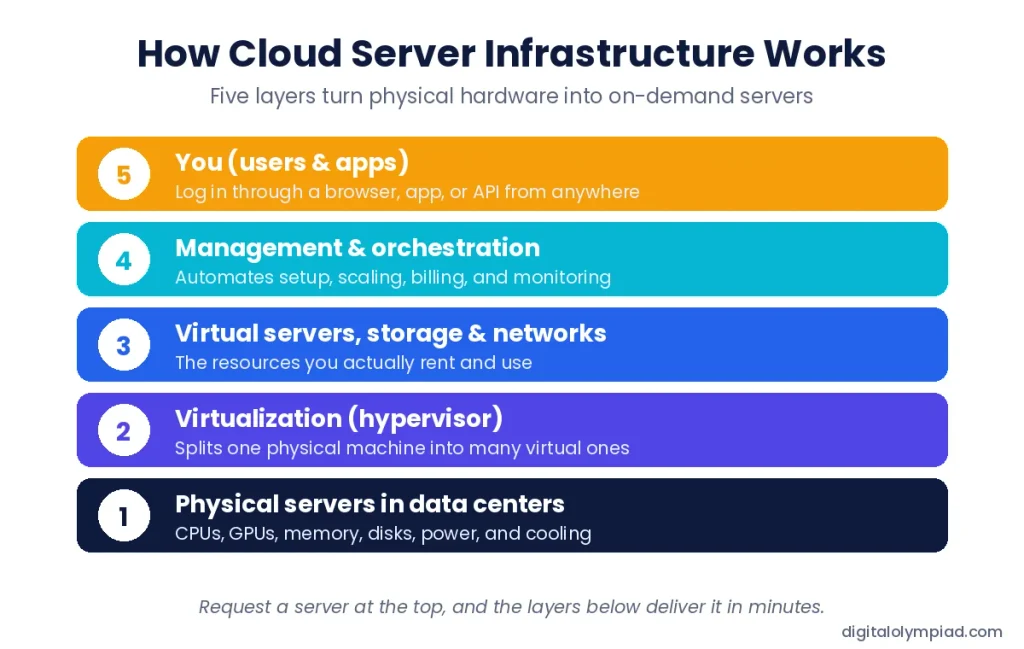
- Physical servers in data centers. Providers fill huge buildings with racks of servers, plus power, cooling, and backup systems.
- Virtualization. Software called a hypervisor divides each physical server into many virtual machines (VMs). Each VM acts like its own computer.
- Virtual resources. These VMs, plus virtual storage and private networks, become the products you rent.
- Management and orchestration. Automation tools handle setup, scaling, health checks, and billing, so nobody has to plug in hardware for your order.
- You. You control everything through a web dashboard, a command line, or an API.
A quick example: An online store expects a traffic spike on Black Friday. Its team sets an auto-scaling rule. When visits jump, the system adds ten more virtual servers in minutes. When traffic drops, it removes them. The store pays only for the extra hours it used.
Core Components of Cloud Computing Server Infrastructure
Every cloud platform, big or small, runs on the same building blocks.
| Component | What it does | Common examples |
| Compute | Runs your code and apps | Virtual machines, bare-metal servers, GPU instances |
| Storage | Saves your files and data | Block storage (disks), object storage (files and media), file storage (shared folders) |
| Networking | Connects everything and controls traffic | Virtual private clouds, load balancers, firewalls, CDNs |
| Virtualization | Splits hardware into flexible units | Hypervisors, containers |
| Management and security | Monitors, automates, and protects resources | Dashboards, identity and access controls, encryption, backups |
Storage is where many people start their cloud journey. If you mainly need a safe place for files rather than full servers, our guide to cloud storage alternatives compares simpler options.
Types of Cloud Servers
Not all cloud servers work the same way. Your choice affects speed, cost, and how much control you get.
| Server type | How it works | Best for |
| Virtual server (VM) | A slice of a shared physical machine | Websites, business apps, dev and test |
| Bare-metal server | A whole physical server, no hypervisor, no neighbors | Databases, gaming, steady heavy workloads |
| Dedicated host | A physical server reserved for you, still managed as cloud | Software licenses tied to hardware, compliance |
| GPU server | Servers with graphics processors for parallel math | AI training, machine learning, video rendering |
| Containers and serverless | Small packaged apps or functions that run only when triggered | Microservices, APIs, event-driven tasks |
Tip: Start with virtual servers. They’re the cheapest and most flexible. Move to bare metal or GPUs only when your workload proves it needs them.
Cloud Deployment Models: Public, Private, Hybrid, and Multi-Cloud
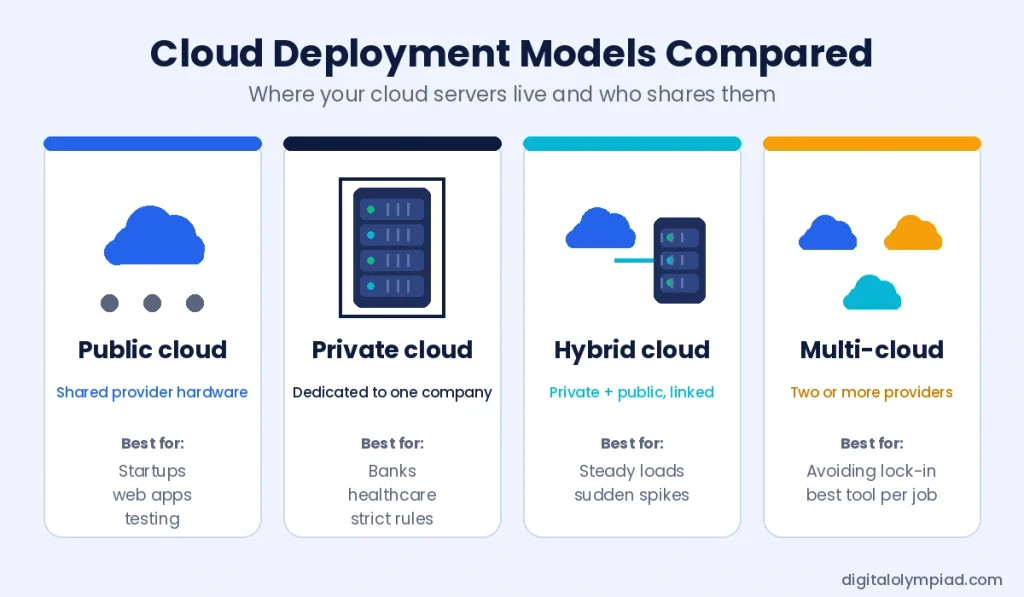
Deployment models describe where your servers live and who shares them.
Public Cloud
A provider owns the hardware and shares it among many customers. You get huge scale and pay-as-you-go pricing. AWS, Azure, and Google Cloud are the biggest public clouds.
Private Cloud
One organization uses the infrastructure alone. It can sit in your own data center or a hosted facility. Teams that build their own private cloud often start with proven rack servers, such as HPE ProLiant servers, and run virtualization software on top. Refurbished models can cut hardware costs while still giving you the control and data privacy that regulated industries need.
Hybrid Cloud
Hybrid cloud links private servers with a public cloud. You keep sensitive data in-house and push overflow traffic or new projects to the public side. Gartner has predicted that 90% of organizations will adopt a hybrid cloud approach through 2027.
Multi-Cloud
Multi-cloud means using two or more public providers, such as AWS for storage and Google Cloud for analytics. It reduces dependence on one vendor, but it adds management work.
Service Models: IaaS vs. PaaS vs. SaaS
Service models tell you how much of the stack you manage and how much the provider handles.
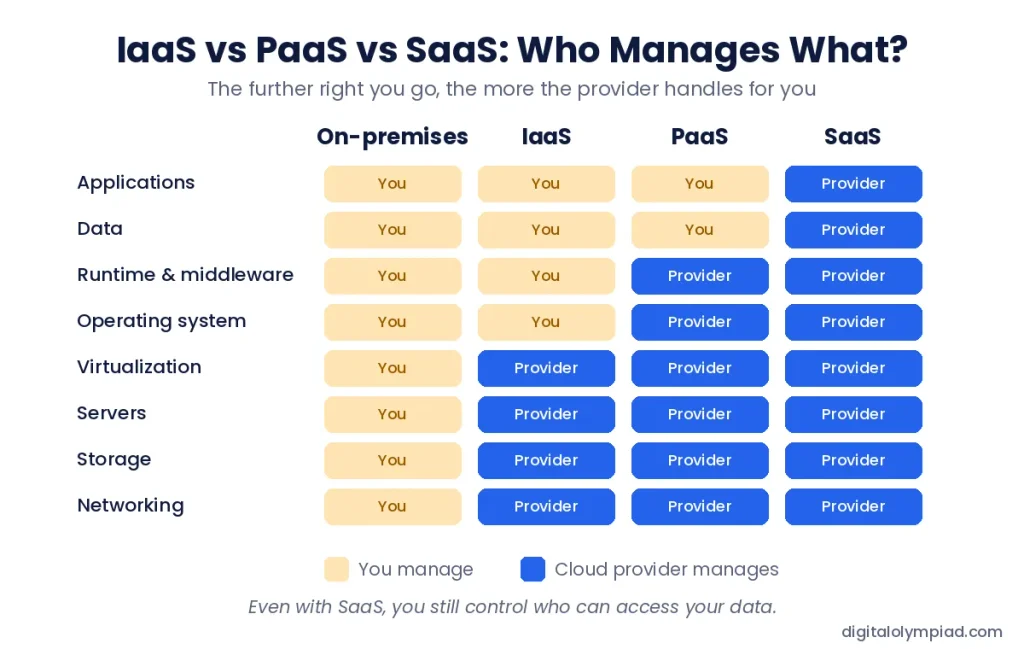
Image file: iaas-paas-saas-responsibility.webp | Alt text: IaaS vs PaaS vs SaaS chart showing what you manage and what the cloud provider manages
- IaaS (Infrastructure as a Service) – you rent raw servers, storage, and networks. You manage the operating system and everything above it. Example: Amazon EC2.
- PaaS (Platform as a Service) – the provider also runs the operating system and runtime. You just deploy code. Example: Google App Engine.
- SaaS (Software as a Service) – you use finished software in a browser. Example: Microsoft 365 or Gmail.
Cloud server infrastructure sits at the IaaS level. PaaS and SaaS products run on top of it.
Cloud Infrastructure Market in 2026: Key Numbers
The cloud market is growing faster now than at any point in the last eight years, and AI is the main reason.
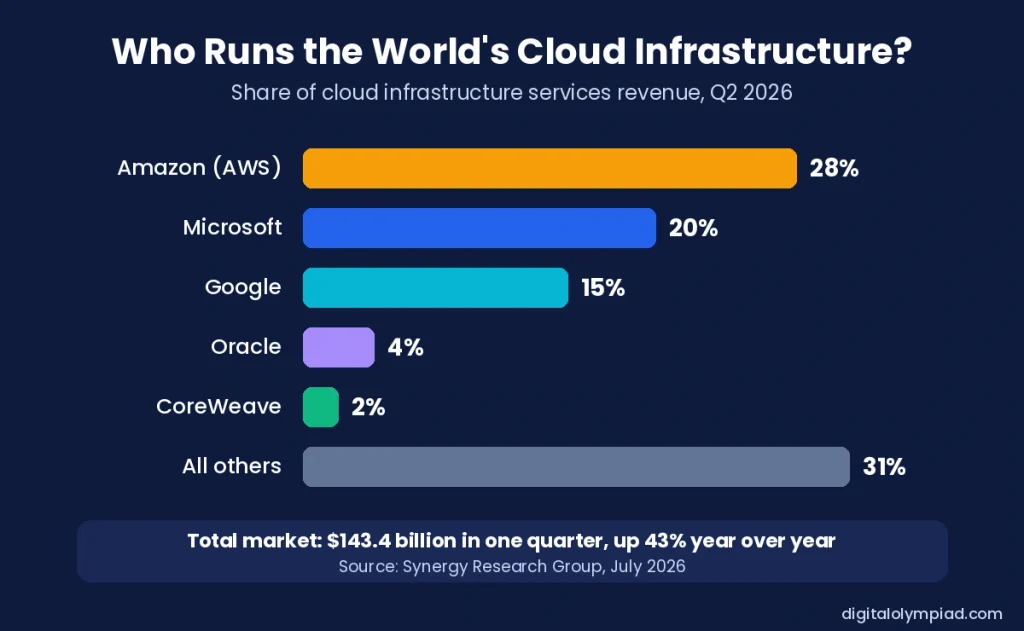
- $143.4 billion was spent on cloud infrastructure services worldwide in Q2 2026 alone, up 43% from a year earlier.
- About $500 billion in revenue came in over the trailing twelve months.
- Amazon leads with 28%, followed by Microsoft at 20% and Google at 15%.
- Generative AI cloud services grew about 165% year over year, the fastest-growing slice of the market.
- “Neoclouds” are rising. GPU-focused providers such as CoreWeave, Nebius, and Crusoe now rank among the fastest-growing cloud companies.
- The U.S. is the largest market and grew 49% in Q2, faster than the global average.
These figures come from Synergy Research Group’s Q2 2026 cloud market report. Looking ahead, Gartner expects public cloud spending to grow about 21% in 2026 and reach roughly $1.48 trillion by 2029.
Benefits of Cloud Server Infrastructure
- Lower upfront cost: no need to buy servers, racks, or cooling before you launch.
- Fast setup: launch a new server in minutes instead of waiting weeks for hardware.
- Easy scaling: add capacity for busy seasons and drop it when things calm down.
- Global reach: run servers close to customers in different regions for faster load times.
- Built-in resilience: spread workloads across zones so one failure doesn’t take you offline.
- Access to advanced tools: use AI, analytics, and GPU power without building it yourself.
Challenges and Risks to Plan For
The cloud isn’t automatically cheaper or safer. Watch for these common problems:
- Surprise bills: idle servers, oversized instances, and forgotten test environments quietly pile up costs.
- Data transfer fees: many providers charge to move data out of their cloud, which adds up fast.
- Vendor lock-in: provider-specific tools can make switching later slow and expensive.
- Shared security duties: the provider secures the hardware, but you still own passwords, access settings, and data protection. Many cloud breaches trace back to a customer’s misconfigured settings, not the provider.
- Outages: even big providers go down. A single-region setup puts you at risk.
- Data location rules: some laws require certain data to stay in specific countries.
Cloud Servers vs. On-Premises Servers
| Factor | Cloud servers | On-premises servers |
| Upfront cost | Low; pay as you go | High; buy hardware first |
| Setup time | Minutes | Days to weeks |
| Scaling | Instant, up or down | Limited by the hardware you own |
| Control | Shared with the provider | Full control |
| Maintenance | Provider handles hardware | Your team handles everything |
| Long-term cost | Can grow with heavy, steady use | Often cheaper for predictable, constant workloads |
Many companies land in the middle. They keep steady workloads on their own servers and use the public cloud for growth, testing, and spikes.
How to Choose the Right Cloud Server Infrastructure
Use this checklist before you sign up with any provider:
- Map your workloads. List what you’ll run, how much traffic you expect, and how steady it is.
- Pick a deployment model. Choose public for speed, private for control, or hybrid for both.
- Size servers carefully. Start small, measure real usage for a few weeks, then adjust.
- Compare total cost. Include storage, data transfer, support plans, and backups, not just the hourly server price.
- Check security and compliance. Confirm the provider meets standards your industry needs, like SOC 2, HIPAA, or GDPR.
- Plan for failure. Use more than one availability zone and test your backups.
- Set budget alerts. Turn on spending alerts from day one so a mistake doesn’t turn into a huge bill.
Final Thoughts
Cloud server infrastructure has turned computing into something you rent by the hour, much like electricity. That shift lets small teams launch products that once needed a full data center.
The smartest approach is simple. Understand your workloads, start small, watch your costs, and mix public and private resources where it makes sense. Do that, and the cloud becomes a growth tool instead of a monthly surprise.
FAQs About Cloud Server Infrastructure
Cloud computing is the service model: renting computing power over the internet. Cloud infrastructure is the physical and software foundation that makes that service possible.
Usually, it’s a virtual machine running on a real physical server shared with other customers. Bare-metal cloud servers are the exception; they give you a whole physical machine.
Amazon Web Services leads with about 28% of the global market in Q2 2026. Microsoft follows at 20% and Google at 15%.
Major providers invest heavily in physical and network security. But security is shared. You must still manage user access, strong passwords, encryption, and correct settings.
It depends on your workload. The cloud usually costs less for new, variable, or fast-growing projects. Owning servers can cost less for large, steady workloads that run around the clock.