Photos are not just snapshots or files but a but a collection of memories but worth preserving. Sometimes, accidently you deleted some of these memories and lose your memories without have any backup of it.
In such cases, photo recovery tools can come in handy. In this blogs we are going to cover top 5 photo recovery software for Windows and Mac (Including Free and Paid both) that are actually can help you to overcome from this.
We will discuss these software’s features, pricing, easy to use, supported file type and support. According to the parameters, these are the tools are making in top: PhotoRec, DMDE, Stellar Photo Recovery, Recuva and R-Studio.
Top 5 Image Recovery Software Free and Paid
Let’s discuss best photo recovery tools of 2026 in details and check which one fits for your need.
1. PhotoRec:
PhotoRec is making top of the list as it offers 100% free recovery from your PC. If you are looking for free option, it supports Windows, MacOS and Linux and supports over 480 file types. But all this comes with a hidden cost, this is a Text-heavy interface so you need to know all its commands to run this software. Additionally, this software didn’t offer to preview the file before recovery and no original file names available.
Overall Ratings:
- Features – 4/5
- Pricing – 5/5
- Easy to use – 3/5
- Supported file type – 4.5/5
- Supported OS: Linux, Mac and Windows
2. DMDE (DM Disk Editor and Data Recovery):
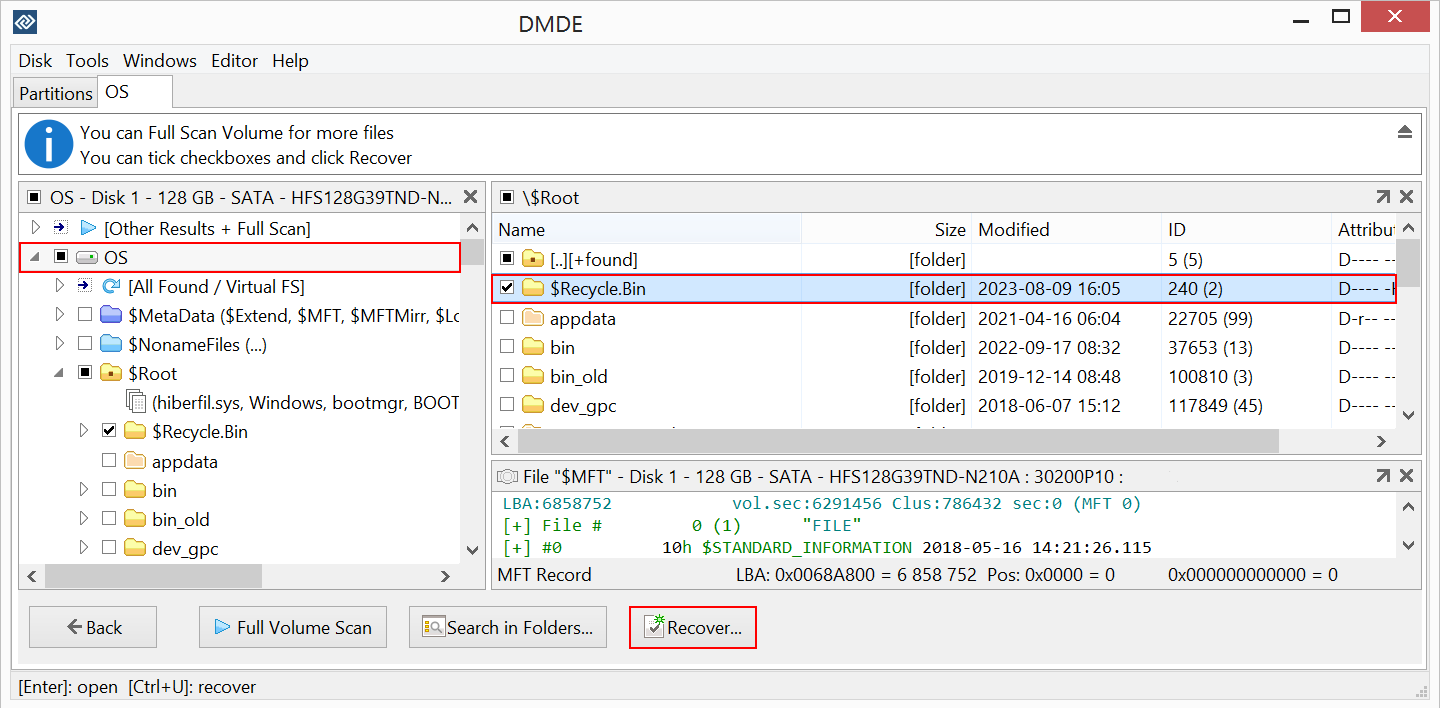
DMDE is a powerful, low-level software (interacts directly with your computer’s raw hardware and data sectors) designed for data recovery. This software is capable for finding lost photos and fixing broken partitions as well. User can recover up to 4,000 files from a single folder at one time for free. It also supports all types of photo formats including complex files like NTFS, FAT16/32, exFAT, Ext2/3/4, and HFS+.
It’s paid version allows you bulk folders recovery and will cost you $20 per year.
Overall Ratings:
- Features – 4/5
- Pricing – 4.7/5
- Easy to use – 3.7/5
- Supported file type – 4.5/5
- Supported OS: Linux, Mac and Windows
3. Stellar Photo Recovery:
Stellar Photo Recovery is the only tools available in the market dedicated for photo recovery. You can recover all types of media files like Photos, videos and audio files. It supports multiple storage devices, 300+ formats, and you can add your customized file format as well. You can preview your recoverable files before downloaded it on your system.
This is a freemium that offers limited free photo recovery and fully version of this image recovery tool will cost you $49.99 for a year. It also offers 30 days’ money back guaranty if you’re not satisfy with the purchase or the performance.
This software is specially designed for professional photographers and directly or indirectly related to this field, along with the easy to use features and software interface, this is placed as the 3rd of the list.
The issue we find is after sale support, they offer many options but the tech support is available only for 5 days in a week.
Overall Ratings:
- Features – 4.8/5(Specially for Media file recovery)
- Pricing – 4.8/5
- Easy to use – 4.8/5
- Supported file type – 4.6/5
- Supported OS: Windows and MacOS
4. Recuva
Recuva is another free recovery tool available in the market made by CCleaner. This software is specialized accidently or permanently deletion of photos from multiple types of storage devices like hard drives, USB sticks, memory cards, and the recycle bin. It is not limited to photo recovery, it can also recover music, documents, videos, and emails.
If we talk about it’s drawbacks, mostly high-resolution videos recover in a corrupted or unplayable state, supports only basic formats only. No preview options for the recoverable files and cannot be trusted with old drives. It’s paid version cost you around $24.95 per year with some additional features.
- Features – 3.8/5
- Pricing – 4/5
- Easy to use – 3.5/5
- Supported file type – 3/5
- Supported OS: Only for Windows
5. R-Studios
R-Studios is a free (with some limits) and open-source robust data recovery software specially designed for professionals. It can easily work with data loss scenarios.
This software can work with complex storage setups and trusted with deep scan to recover old deleted photos and supports photo, video, documents, PDF, Excel and many more file types with including 100+ file formats.
As we already mentioned, this tool is specially for tech-savvy users, so it has complex user Interface and can recover only 1,024 KB per file with free software version. No technical support for free users, if you upgrade with it’s any paid plans started with $39.99 per year.
- Features – 4.2/5
- Pricing – 4.2/5
- Easy to use – 3/5
- Supported file type – 4.6/5
- Supported OS: Windows, Linux and MacOS
Comparison Table
| Software | File Types Supported | Free Version | Free Limit | Paid Price | Supported OS | Tech Support | Preview Before Recovery | Best For |
| PhotoRec | 480+ file types | Yes (100% free) | No limit | No paid version | Windows, Mac, Linux | Not mentioned | No | Users okay with command-line tools |
| DMDE | NTFS, FAT16/32, exFAT, Ext2/3/4, HFS+ | Yes | Up to 4,000 files per folder | $20/year (bulk folder recovery) | Windows, Mac, Linux | Not mentioned | Not mentioned | Fixing broken partitions + photo recovery |
| Stellar Photo Recovery | 300+ formats (+ custom formats) | Yes (Freemium) | Limited recovery | $49.99/year (30-day money-back) | Windows, macOS | 5 days/week only | Yes | Professional photographers |
| Recuva | Basic formats only | Yes | No fixed limit mentioned | $24.95/year | Windows only | Not mentioned | No | Recovering photos, music, docs, videos, emails |
| R-Studio | 100+ file formats | Yes | Up to 1,024 KB per file | $39.99/year | Windows, Linux, macOS | None for free users | Not mentioned | Tech-savvy users, deep scan recovery |
How to Prevent Photo Loss and Keep Your Photos Safe?
There are many ways to protect your precious photos from losing it again in future.
- Keep Multiple Backups: Always create multiple copies for your important photos or files on external drive, SD card or cloud storage.
- Enable Automatic Backup: Always turn on automatic backup so your photos and other important files can’t be lost due to accidental deletion.
- Safely Eject SD Cards and External Storage Drives: Make sure you always eject SD cards and other storage devices before removing them from your PC.
- Check Your Backups Regularly: If you are about to delete a backup file, carefully check to ensure it doesn’t contain any important photos or files, this allows you to detect any potential corruption or deletion of any important file.
Final Verdict:
Now that we have learned a great deal about the best photo recovery tools, you can choose the one that best suits your preferences and needs. If your goal is to select the best free photo recovery software, “PhotoRec” stands out as the top choice; however, in terms of overall value for money, “Stellar Photo Recovery” and “Recuva” emerge as the best options. You can now use whichever tool works best for you.
Frequently Asked Questions:
If you don’t want to spend a penny, PhotoRec is your best bet. It’s completely free, works on Windows, Mac and Linux, and supports 480+ file types. Just be ready to deal with a command-line style interface since there’s no fancy design here.
Yes, they genuinely do. PhotoRec, DMDE, Stellar Photo Recovery, Recuva and R-Studio have all been tested and proven to recover lost photos. Of course, results depend on your device, how long ago the file got deleted, and which tool you pick.
Most of the time, yes, as long as you act fast before new data overwrites the space. Tools like DMDE and R-Studio go deeper into your storage and can even fix broken partitions, so they’re a good shot for permanently deleted files too.
Yep, Recuva has a genuine free version that recovers photos, videos, documents, music and emails from drives, USBs, memory cards and even your recycle bin. Want extra features? The paid plan is around $24.95 a year.
It depends. Older files have a higher chance of being overwritten by newer data over the years, so there’s no guarantee. That said, DMDE and R-Studio are built for deep scans and tricky recovery situations, so they’re worth trying first.
Pick a tool that does deep scanning and supports complex file systems, DMDE or R-Studio are good picks here. And honestly, before you panic, check your existing backups first. Sometimes those “lost” photos are just sitting safely in a cloud folder you forgot about.
Stellar Photo Recovery, hands down. It scores higher across features, pricing, ease of use and file support in our comparison. It’s the only tool here made specifically for photo recovery and it handles videos and audio too, though it does cost more at $49.99/year.
Stellar Photo Recovery takes the top spot for PC photo recovery. It’s easy to use, packed with features, and works great whether you’re a professional photographer or just someone who accidentally deleted their vacation pics.
It varies a lot. PhotoRec is free. On the paid side, DMDE starts around $20/year, Recuva is about $24.95/year, R-Studio comes in at $39.99/year, and Stellar Photo Recovery is the priciest at $49.99/year.
If you need bulk recovery, better file format support or proper customer support, then yeah, paying is worth it. But for basic, one-off recovery needs, a free tool like PhotoRec can honestly do the job just fine.